Someone Is Emailing as Your Nonprofit. It Wasn’t a Hack.
The setting that let it happen is one many nonprofits never look at.

A director of a nonprofit I serve recently forwarded me some mysterious emails with the message, “Help! Someone is sending from my domain!” The director and his CEO had both noticed that emails were being sent from their respective email addresses without their knowledge. They were fairly innocuous-looking messages that contained suspicious links. Not how you want to start your work day.
Here’s the unsettling part: this isn’t hard. Any joker with a free afternoon can put your-name@your-site.com in the From line of whatever they like.
So this client gave me a temporary admin seat in their Microsoft 365 account and I put on my deerstalker cap and set off to do the detective work to find out:
- What the nature of the security flaw was
- How many accounts had been affected
- Whether any of their systems had been compromised
Main problem: their DMARC record was set to p=none, which tells the world’s mail servers to deliver faked mail anyway. By the time I was done, the problem was solved and the client’s email program was more secure.
What I did:
- I tightened up their DMARC record (more on that below)
- Improved their DKIM record
- Blocked the offending IP address
- Removed some stale DNS records for extra hygiene
- Made sure there were no sneaky auto-forwarding rules that were open
Thankfully, their team had been shrewd enough to recognize the spoofed emails as suspicious and no one had downloaded any malware or granted the bad guy permissions. And no one’s account was hacked. It was just a single DNS record that gave the attacker an opening. If only every organization were this lucky.
The “From” Line Is Just a Label
How does a hacker end up sending an email that appears to be from your email address?
First, you need to know that there is nothing magical about that From line; it’s not much more sophisticated than the empty space in the upper-left corner of any paper envelope you mail. Anyone can write anything they like there.
Email spoofing works the same way: a crook writes his own letter, puts your return address on it, and mails it. Unless the recipient has a way to check for a signature only you could have made, they’re going to have a hard time knowing whether the letter is really from you or not.
The good news here is that a spoofed email, while dangerous and tricky, does not indicate a catastrophic compromise to your organization’s email accounts. It just means that your DNS (Domain Name System) records aren’t set up to stop it. DNS records are public instructions for your domain: part phone book, telling the world where to send your email, and part rulebook, telling receiving servers how to check that a message claiming to be from you really is.
What DMARC Is (and What p=none Means)
To understand how DMARC works, I briefly need to touch upon two other important email-related DNS record types: SPF and DKIM. The short version is that SPF and DKIM are two independent authentication methods. SPF checks that the server sending a message is on your approved list, and DKIM checks that the message carries a valid digital signature from your domain. DMARC ties both to the “From” line people actually see, and tells receiving servers what to do when a message fails.
Many acronyms are no less clear than the words they shorten, but DMARC is surprisingly semantically rich: Domain-based Message Authentication, Reporting, and Conformance. So DMARC focuses on messages sent from your domain, authenticates them, reports on them, and enforces their conformance to the rules you’ve set.
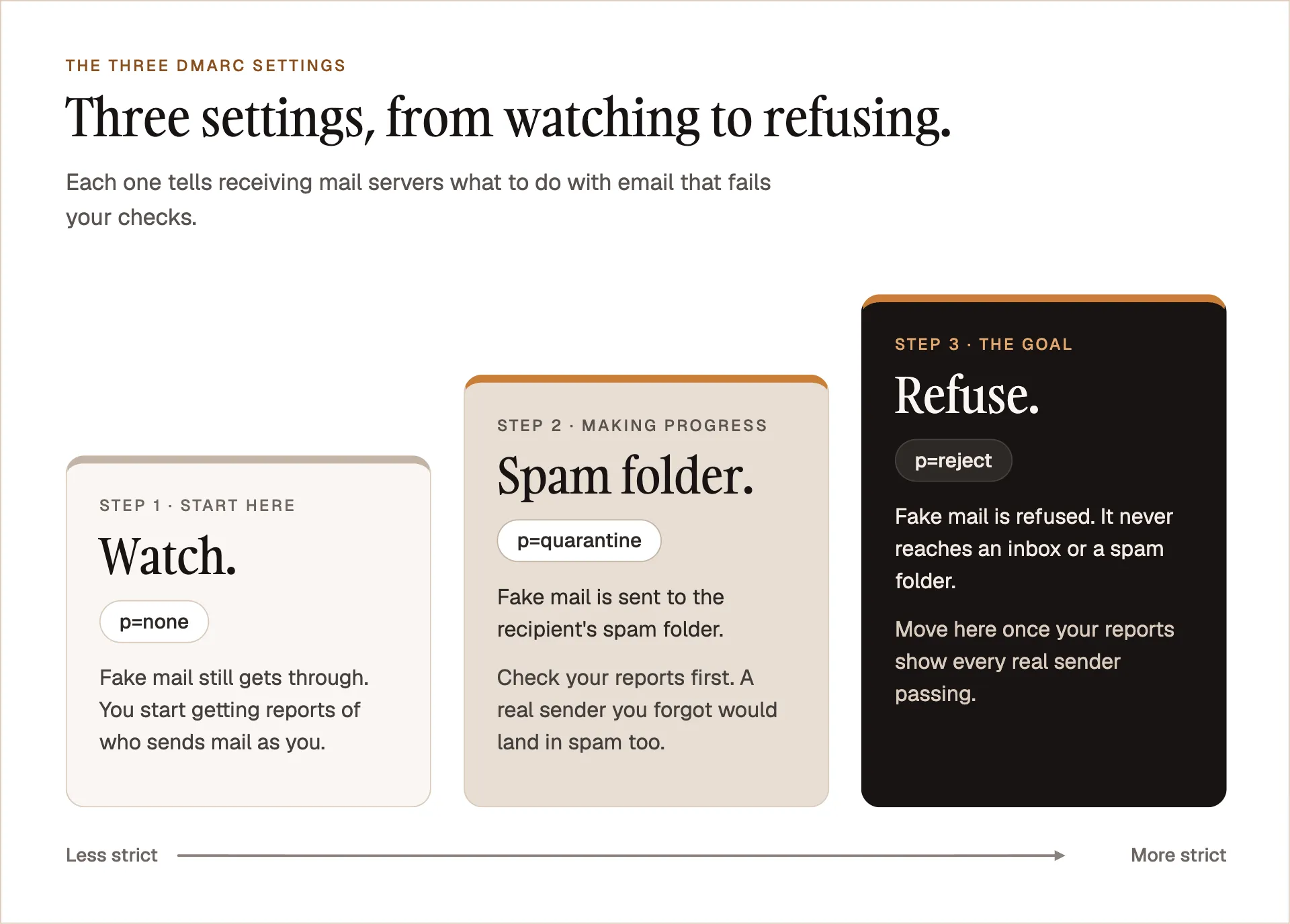
The most important function of a DMARC record is to instruct a receiving mail server to do one of three things when a message claiming to be from your domain fails its checks. The instruction is written as a policy tag, p=X, where p stands for policy and X is the action you want taken:
- Do nothing and report.
p=none. Receiving servers deliver the message as they normally would. If your record includes a reporting address (more on that below), they also send you reports on who is sending mail as your domain. - Quarantine.
p=quarantine. Failed messages are sent to the recipient’s spam or junk folder. - Reject.
p=reject. As you might guess, this policy instructs the server to reject the failed email outright.
Without DMARC, SPF and DKIM leave a gap: neither one checks the From address your reader actually sees, and neither tells receiving servers what to do when a check fails. It’s like a security camera that’s turned on but has no one monitoring it.
What Spoofing Can Cost Your Organization
Failing to protect your organization and your supporters from spoofing can cost real money, create legal risk, and damage your reputation. For scale, the FBI’s Internet Crime Complaint Center reported $2.77 billion in business email compromise losses in 2024, and spoofed email is one of the tools behind that kind of fraud.
The ways a spoofed email can damage your organization are limited only by the attacker’s imagination. Imagine an attacker could:
- Send financial instructions to your accountant or CFO or anyone who can spend your money
- Send your donors messages with links to webpages that contain malware
- Send fraudulent invoices on your behalf
- Send emails that appear to come from your CEO to anyone else in your organization, telling them to share credentials to an important system
- Send offensive emails that promote causes antithetical to your org’s vision and mission
Makes your skin crawl, right? It’s kind of wild how much damage a sloppy email setup can cause. The good news is that getting it right is manageable and doesn’t require expensive tools.
So Why Does p=none Exist?
Good question. There are cases, mostly for limited timeframes, in which having p=none as your DMARC policy is the right choice. I won’t go into depth here or discuss the nuances of a progressive move from none to quarantine to reject, but just know that your IT guy isn’t necessarily crazy for wanting your organization to start out with p=none.
Some situations that can call for p=none:
- Initial Deployment: Establish a baseline before enforcing any policy.
- Post-Migration: You may want to leave
p=nonefor a limited period of time after migrating to a new email service provider (ESP) to make sure no legitimate emails get lost. - Unknown Senders: You may not yet know everything that sends email from your domain.
- Compliance Minimums: Some mailbox providers only require that a DMARC record exist. Google’s and Yahoo’s bulk-sender rules, for example, accept
p=none. That makes it a floor, not a recommendation.
So p=none is a legitimate starting point, but it should be a stage, not a destination. It watches; it doesn’t protect.
Why Nonprofits Are Especially Exposed
Nonprofits have a unique risk surface when it comes to email because they are often run by team members who are wearing too many hats. The person who was hired to run social media and write blog posts also ends up running the email program. They do their best to set things up correctly, but you don’t know what you don’t know.
On the other hand, when the nonprofit does help their staff by adding capacity with contractors, there is often no one internally who knows where the seams between those contracts lie. “Little things” like email DNS records can fall through the cracks.
Nonprofits rely on many tools that send email as the organization: donation platform, CRM, newsletter, event tool, website form, staff mailboxes, etc. That’s a lot to keep track of.
Finally, as someone who has worked in and with many nonprofits through the years, I can tell you that a good nonprofit treats its donor and audience email lists as a precious resource it has an ethical duty to protect and steward. The idea of taking the goodwill of a nonprofit donor list and compromising those people’s security and brand perception is every nonprofit leader’s worst nightmare. One fraudulent email preying upon the generosity and mission-alignment of a donor list could cause untold harm to the donor base and to the mission.
Check Your Own Domain in Five Minutes
What can you do to find out whether someone could spoof your domain?
Step 1: Look it up
There are lots of good DMARC checkers available for free online. MxToolbox works just fine: https://mxtoolbox.com/dmarc.aspx
For the more technically adventurous among you, try it out in Terminal:
Mac
- Open Terminal app
- Paste
dig TXT _dmarc.example.com +short(swap your domain) and hit return - Voilà: your DMARC record
Windows
- Open PowerShell (Start menu, or a PowerShell tab in Windows Terminal).
- Paste this, replacing yourdomain.org with your domain:
(Resolve-DnsName -Name _dmarc.yourdomain.org -Type TXT).Stringsand hit Enter - Voilà: your DMARC record
Step 2: Read the policy
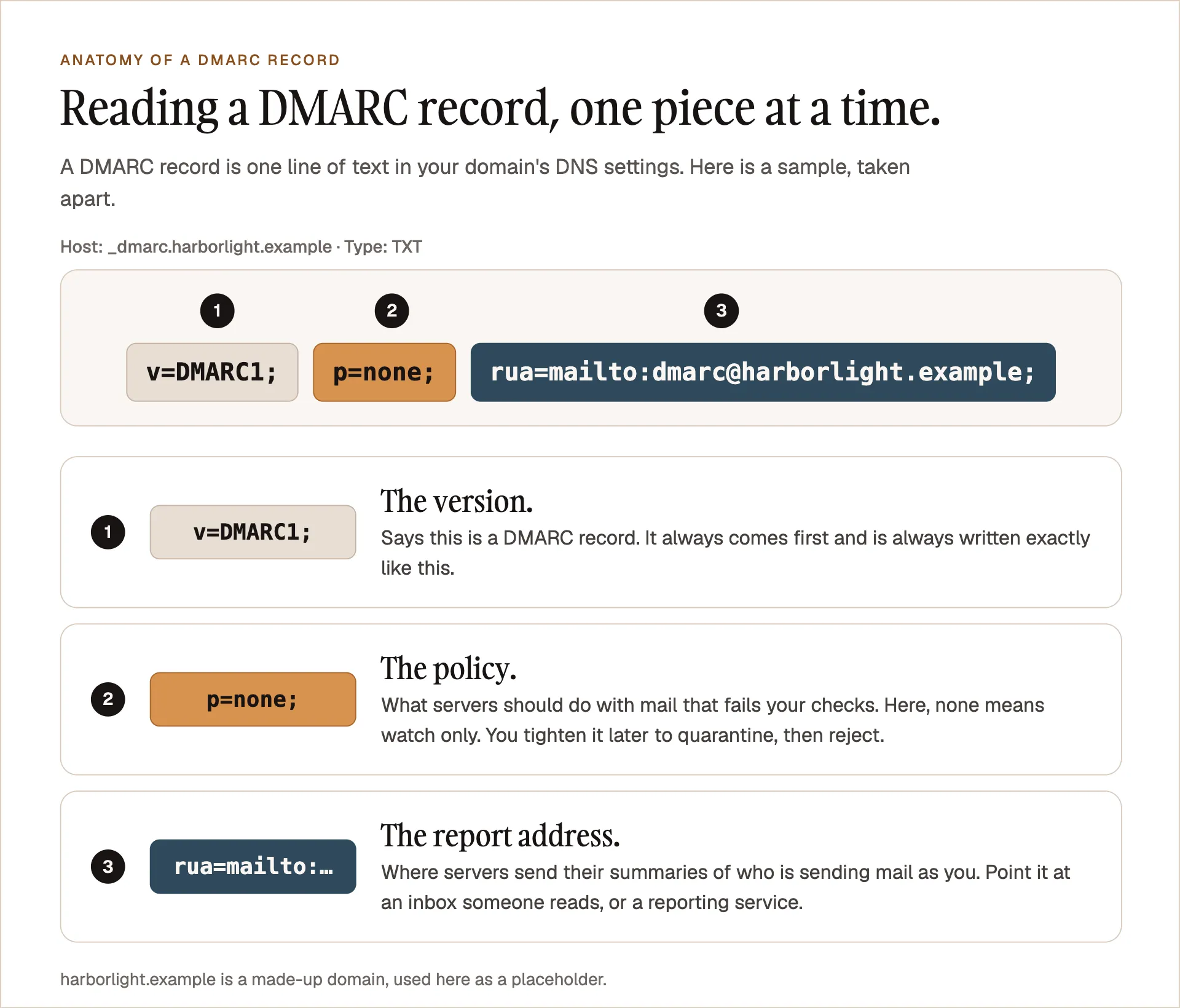
Once you have your DMARC record, see what the policy is: is it p=none, p=quarantine, or p=reject? If the lookup comes back empty (or, on Windows, with a “DNS name does not exist” error), you have no DMARC record at all. That is the least protected position, because nothing tells receiving servers what to do with fake mail.
Step 3: Check the recipient
Look for what’s called a rua address, which is where receiving servers send their reports. For example, rua=mailto:dmarc-inbox@example.com. Does anyone in your organization check on the DMARC inbox your record sends to? A record that reports to an inbox no one reads is only half working.
How to Move From p=none to Enforced Without Breaking Your Mail
If you find that your DMARC policy is set to p=none and you’re convinced it’s time to begin the progression from None to Quarantine to Reject, it’ll help to do a little planning.
-
You’ll need to set up a dedicated inbox (
dmarc-reports@your-domain.com) and assign that inbox to the right person in your organization.Note: If you decide you want to send those DMARC reports to a domain other than your sending domain, you’ll have to work with whoever manages that domain to add an extra TXT DNS record so they can officially approve receiving someone else’s DMARC reports.
-
After a few weeks of collecting those DMARC reports, you’ll then want to compare the contents of those reports to your approved list of senders.
These reports arrive as XML files and are not easily human-readable so you’ll probably want help or a tool to assess them.
-
First, fix any legitimate sender that fails (usually by adding it to your SPF record or turning on DKIM for it). Then move the policy to
p=quarantine, watch your reports for a few weeks, and finally move top=reject.
Important note for nonprofits: do not start experimenting with your DMARC records in the middle of an important year-end or matching campaign. You can inventory whenever you want, then plan for a slower season to start enforcing.
Nonprofit leaders, if you desperately try to turn every week of the year into an “important” campaign week, then your team will never have time to step back, assess their systems and results, and make systemic improvements. Please give your teams time to work on the work. This will also give your audience and donor list a rest, and you can avoid spamming them with appeals like “Donate for national potato day.”
What DMARC Won’t Do
While a bad DMARC record can cause many kinds of problems, and a good DMARC record can prevent some problems, it’s important to understand that this is just one small component of a secure and healthy email system. Hackers are creative and there are many other ways they may try to harm your organization through email.
What DMARC won’t prevent:
- Lookalike domains (googel.com vs google.com)
- Using a display name that is the same as one of your directors (the email comes from a different domain but shows a colleague’s name)
- A hacked account, such as one taken over through a reused password. The mail really does come from your domain, so DMARC passes it. (For the love of God, never use a password twice, and turn on multi-factor authentication.)
DMARC enforcement can also cause its own problems if you’re not careful. If you don’t carefully monitor your DMARC reports and keep an inventory of all your sending domains and services, legitimate messages can be lost or sent to spam.
Finally, just because an email passes DMARC authentication does not mean that it is a safe email. DMARC is just one link in the email security chain.
Monday Morning: Three Steps Toward Safer Email
Here are three simple steps you can take toward a secure email system:
- Look up your domain’s DMARC record and note what it says.
- List every service that sends email as your organization, and who at the organization or an outside vendor controls each one.
- Decide who owns DNS records as a whole for your organization. Then decide who is responsible for each individual record and put their name next to it.
Don’t Ignore the Weird, Random Bug
When you’re busy running a nonprofit, digital security can feel like the last thing on your list as you juggle fundraising, finances, donor relations, direct report 1:1s, compliance, and not least of all executing your mission. I’m not trying to make you feel overwhelmed by raising concerns about something as niche and technical as your DMARC record. My hope is that this blog post gives you just enough information to make sure the right person on your team is aware and that your organization is protected.
Mast Strategy exists to help nonprofit team members who are already wearing multiple hats avoid adding many more to the stack. If your check turned up p=none, or nothing at all, that’s a conversation worth having. Book a free 30-minute call and bring what you found in Step 2, or start with an Email Deliverability Audit: a plain-English review of SPF, DKIM and DMARC for everything that sends email as your organization, with a prioritized fix list. Nonprofit pricing is available.
Mast isn’t the hero of this story. The client who brought me in on their problem successfully identified a sneak attack and they avoided being tricked into granting an attacker permissions to their systems. They took action and asked for help at the right time rather than ignoring a “weird, random bug” and using business as an excuse.